Brief it.
Save your business, audience, offer, goal and preferred style. That context travels with the prompt you choose.
One business brief. 50 useful builds.
The landing page you need. The workbook you could sell. The customer help pack you keep meaning to make.
AssetSprint 50 turns your business brief into practical starting points for all of them. Choose a job, adapt a tailored prompt and take it into the appropriate ChatGPT experience with a clear idea of what you want to finish.
One payment. Complete front end. 30-day refunds.
Guidance for ChatGPT Work and Codex. Your own AI access is separate.
Let’s give it a proper brief.
Maybe it’s a page for your next offer, a downloadable resource for your audience or a clearer set of onboarding instructions. You know the business needs it. Turning that intention into a specific job is the first step.
AssetSprint gives you a place to start: what to ask for, which materials to provide and what to check when the first version comes back.
Save your business, audience, offer, goal and preferred style. That context travels with the prompt you choose.
Choose a useful job. Adapt its prompt, then take it into ChatGPT Work or Codex with the files and details the task needs.
Check the result against your goal, ask for specific refinements and save the version you can put to use.
The toolkit prepares and organises the prompts. You work with the appropriate AI experience separately to create and check the finished asset.
Start with the outcome your business needs. Here are four places you could begin.
Bring the offer details, the audience and the action you want visitors to take. Use the workflow to brief a focused landing page you can preview and refine.
An editable page with a clear headline, benefits, answers to buying questions and a specific next step.
Some projects need source files, hosting, integrations or specialist help. Access to AI tools and any related third-party services is separate.
One brief, a searchable library and a prompt you can make your own. See the workspace you’ll receive.
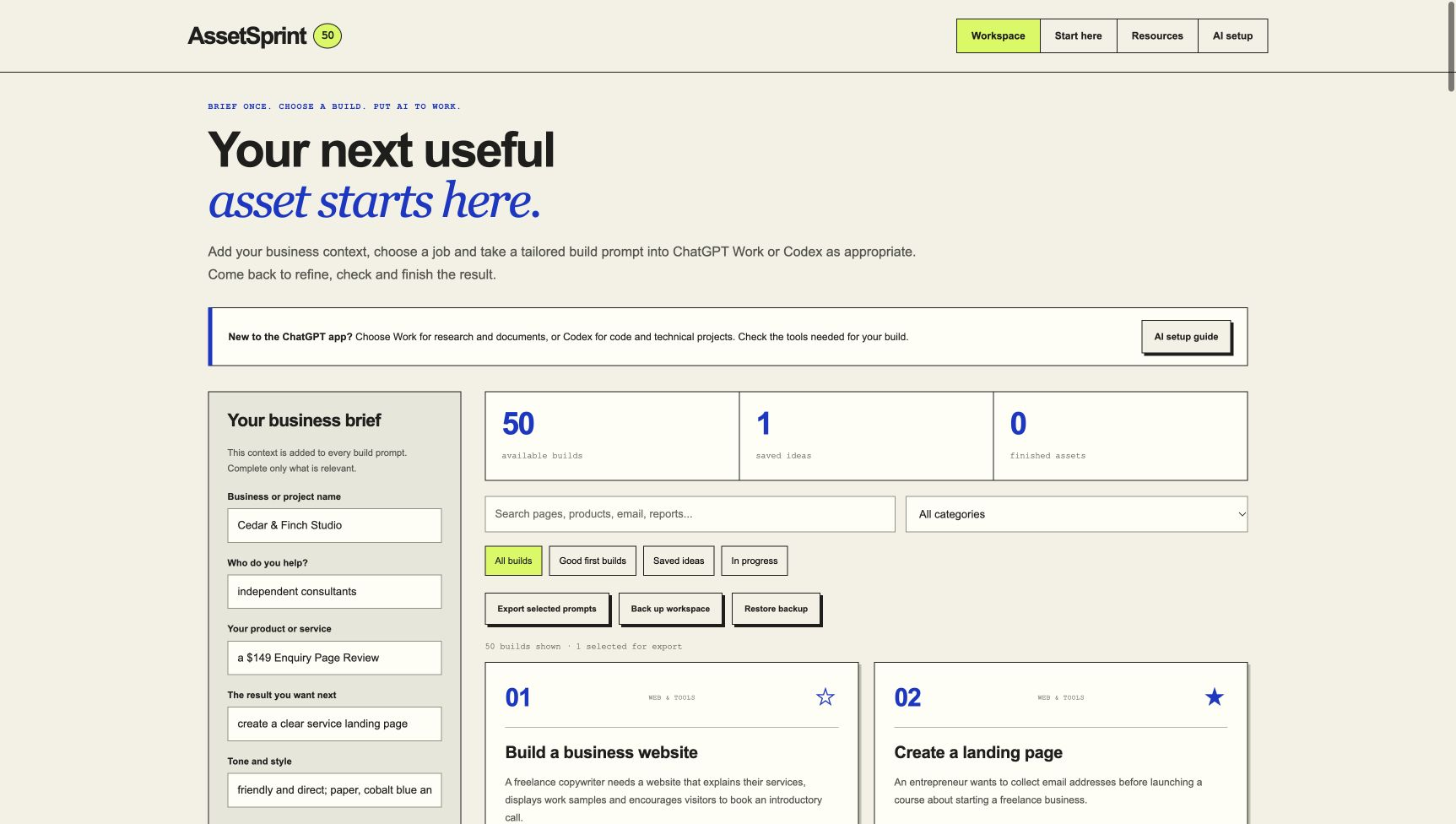
Your context stays close. Your brief, favourites, prompt edits and progress are saved in your browser when storage is available. Export a backup of work you want to keep.
Your next step stays clear. Each build includes a materials checklist, a detailed prompt, specific quality checks and a refinement prompt. Your chosen AI experience performs the work after you supply the context and files.
A walkthrough of the real toolkit with on-screen guidance and a music soundtrack. The sample business is fictional.
Packed for practical work.
The software gives you a starting point. The guides and editable resources help you make something of it.
You receive the complete front-end package for one payment. Use it in your own business and when creating reviewed outputs for clients.
See the $9 offerAll 50 builds, a saved brief, search and filters, favourites, editable prompts, export and progress tracking.
The 56-page playbook: 50 complete build prompts, practical examples, materials checklists, 150 task-specific checks and 50 refinement prompts. Linked contents help you find the right project.
A worked first build, five beginner routes and a seven-day framework for choosing, building and reviewing an asset at your own pace.
A business brief, landing-page outline, lead-magnet outline, client project brief and asset review checklist.
A fictional service page supplied as editable HTML, so you can see a concrete asset and adapt its structure.
Use adapted templates and your reviewed outputs in your business and client projects. Resale of the toolkit or library is excluded.
Turn a product idea, source material or area of expertise into a brief for a workbook, course resource, listing or sales page.
Give a client project a clearer starting point, from proposals and onboarding to landing pages and customer resources.
Improve a page, organise a process or make sense of business data. Choose the task you need next and supply the relevant materials.
AssetSprint 50
Pick one thing your business needs. Give it a proper brief. Then put your AI assistant to work.
One payment for the delivered edition.
No subscription to AssetSprint.
Download, unzip and open the toolkit in your browser. Your own AI access is separate. See the ChatGPT / Codex requirements below.
Request a refund within 30 days of buying the relevant product. Email your receipt details to Andie. No usage proof required.
Two optional upgrades follow checkout: Build Lab, $27, and Client Studio, $47. You can decline either or both and use the complete front end. Each has its own 30-day refund period.
The enhanced guides cover ChatGPT Work for research and finished documents, and Codex for code and technical projects. Choose the experience and tools appropriate to the task. Other capable assistants may need adaptations. The new ChatGPT desktop app includes Chat, Work and Codex. ChatGPT Work is designed for research, analysis and deliverables; Codex focuses on software development and technical work. This toolkit does not include either service or guarantee that every workflow runs in ordinary Chat. Check your account access and the tools required for your chosen job. See OpenAI’s app guide.
The PDF is one part of the package. You also receive the local browser toolkit, 50 tailored prompt cards, a seven-day planner and five editable starter templates.
The application builds and organises your personalised prompts. You copy the prompt into the appropriate ChatGPT experience, provide the required files or context, and work with your AI assistant to produce and review the deliverable.
No API key is needed to use the downloaded prompt builder. Access to Codex or another AI service is separate and may have its own account requirements and charges.
The toolkit can be used without writing code. The prompts cover both technical and nontechnical jobs. Websites, integrations and other technical builds may still need setup, testing or specialist help depending on their complexity.
The prompts are plain text and can be adapted. The guides suggest ChatGPT Work or Codex according to the task. Check that another assistant has the file, coding, browser or document tools the job requires.
No. AssetSprint 50 is a complete standalone purchase. Build Lab and Client Studio are optional packs shown after checkout. You can decline either or both.
Build Lab is $27 once for 15 complete implementation packs with worked examples and 20 editable resources. Client Studio is $47 once for eight service delivery kits, 20 client documents and an offline Project Desk. Neither is a recurring subscription.
Yes, the front end permits using adapted templates and reviewed outputs in your own and your clients' businesses. It does not permit redistributing the AssetSprint library, application or training as a competing product or passing resale rights to others.
The downloaded application stores your brief in your browser. Keep an export of important work, and remember that clearing browser storage or changing browsers may remove local saved information.
Email andie@andiebrocklehurst.com. Include your purchase email or receipt so we can identify the order. Each product has a 30-day refund period.
A toolkit from Andie Brocklehurst
AssetSprint 50 is built around the work an online business needs: a clear brief, a concrete output and a way to review it. Start with one project, work through the details and keep what helps your business move forward.
Get the complete $9 toolkit